v1.0.0 · free forever · no account

Tower Defense X runs
on repeat.

Record the same tower placements and upgrade sequence once, then replay it endlessly on a hotkey while you step away. No reconfiguration between runs—build once, farm forever. The macro captures every click and keystroke, so the exact routine plays back identical each time.

No telemetry, no trackingFree forever, no upgradesRuns fully offlinev1.0.0
Record once, replay foreverStep away and farm XPSame placement every waveFree, no setup neededWorks in fullscreen games
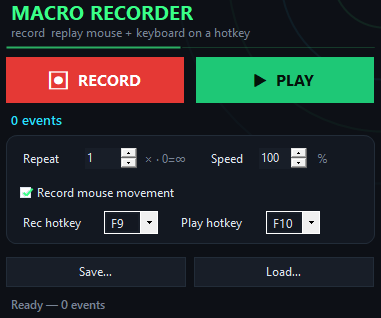
Tower Defense X Macro app window on Windows
Record your first run

How to record and farm a tower defense map.

Start the macro, perform your tower routine once, and replay it as many times as you want.

What happens on replay
Inside the appTower Defense X Macro window

Your tower placement runs identically across every replay.

When you record a tower defense routine, every click and keystroke gets captured at the input level—including tower placement, upgrade paths, and sell decisions. Hit the hotkey and watch the macro execute the exact same sequence without drift or timing variation.

Placement stays lockedTowers land on the same tiles, same timing, every single run.
Upgrades follow the pathEach upgrade click triggers in the exact order you recorded, no deviation.
You farm on scheduleStart the macro, close the window, return to stacks of XP and gold from completed runs.
Macro vs. manual replay

How tower defense macro recording beats manual replay.

A recorded macro eliminates timing error and attention fatigue—you do the run once, the computer does it a hundred times.

Tower placement accuracy
Pixel-perfect, every run
Varies by hand steadiness
Time per completed run
Seconds at 1000% speed
Minutes of active play
Attention required
Zero while replaying
Constant focus needed
Consistency across 50 runs
Identical every time
Drift and mistakes accumulate
Cost to set up
Free, forever
Your time, repeated
Runs offline
No internet needed
Depends on game launcher
Why automate the grind

Why record your tower defense routine instead of playing it manually.

Grinding the same map and strategy dozens of times is the job a macro was built for.

01

Stop clicking the same spots

Your fingers and your focus go elsewhere while the macro handles every placement decision you already made. No mental load, no fatigue, no mistakes.

02

Replay saves the strategy

The routine lives as a file on your machine. Load it next week or on another PC and run the same build without relearning the sequence.

03

Compress hours into a hotkey

Run the macro at normal speed, 10x slower to debug, or blast it at 1000% if your PC handles it. Finish in seconds what would take minutes by hand.

04

Nothing touches the game

The macro replays regular keyboard and mouse input—no game modification, no injection, no wrapper. You stay in control of what the game sees.

Before you start

Common questions about tower defense farming.

Does the macro work while the game is in the background?

Yes, it runs regardless of which window is focused. Start it, switch to your browser or another app, and the routine continues.

Can I edit the recording after I save it?

You can't edit the file directly, but you can record a new version any time. Load the old file, tweak your strategy, and record again.

Will this trigger the game's anticheat?

The macro replays ordinary mouse clicks and keystrokes with no modification or injection into the game. Whether a specific game accepts this is determined by its own anticheat rules, which you should verify.

What if my tower defense game needs exact timing?

Use the speed slider to tune replay speed. Test at 10% to debug, then adjust upward until the towers place and upgrade correctly.

Can I run multiple macros at once?

You record and replay one routine at a time. For complex sequences, build them into a single recording.

Does it work on Windows 11?

Yes, both Windows 10 and Windows 11 are supported.

Is there a way to stop a replay mid-run?

Press F10 again to halt the current playback at any point.

Start farming tower defense maps on autopilot.

Record your strategy once and replay it as many times as you want—at your own pace or accelerated to finish in seconds.

Download for Windows
Latest release · v1.0.0

Tower Defense X Macro guides